
Input Lag Is Probably Ruining Your Aim More Than You Realize
What actually happens between clicking your mouse and seeing the shot? Here’s how input lag works and when humans can really notice it.
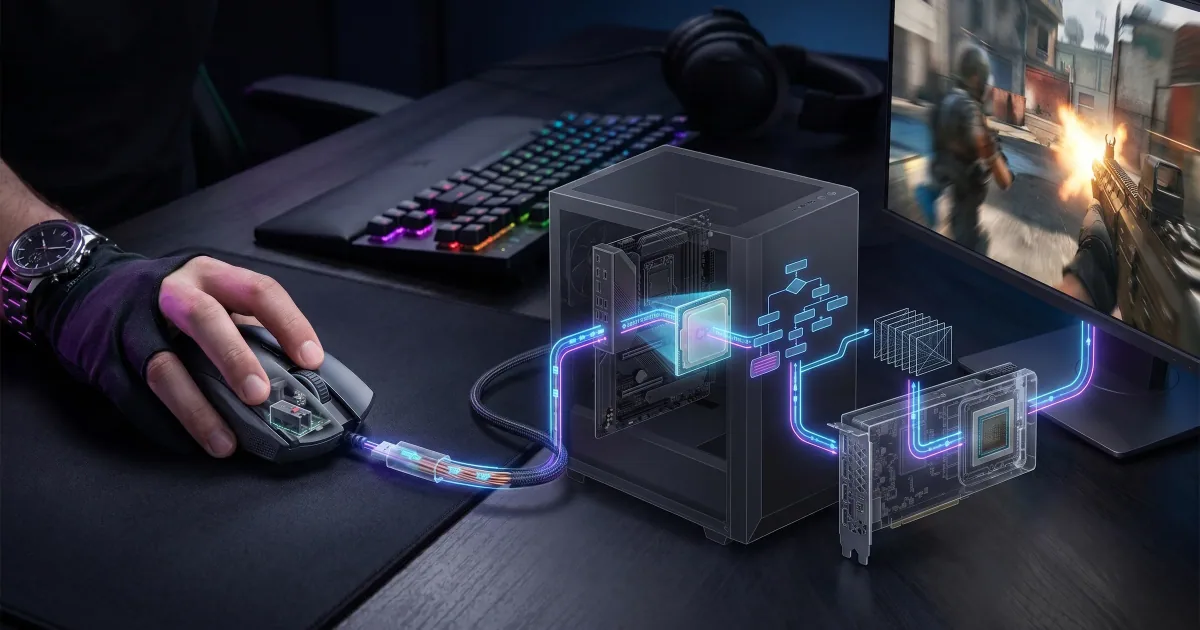
You click the mouse.
The gun fires.
Those two events feel simultaneous, but they aren't.
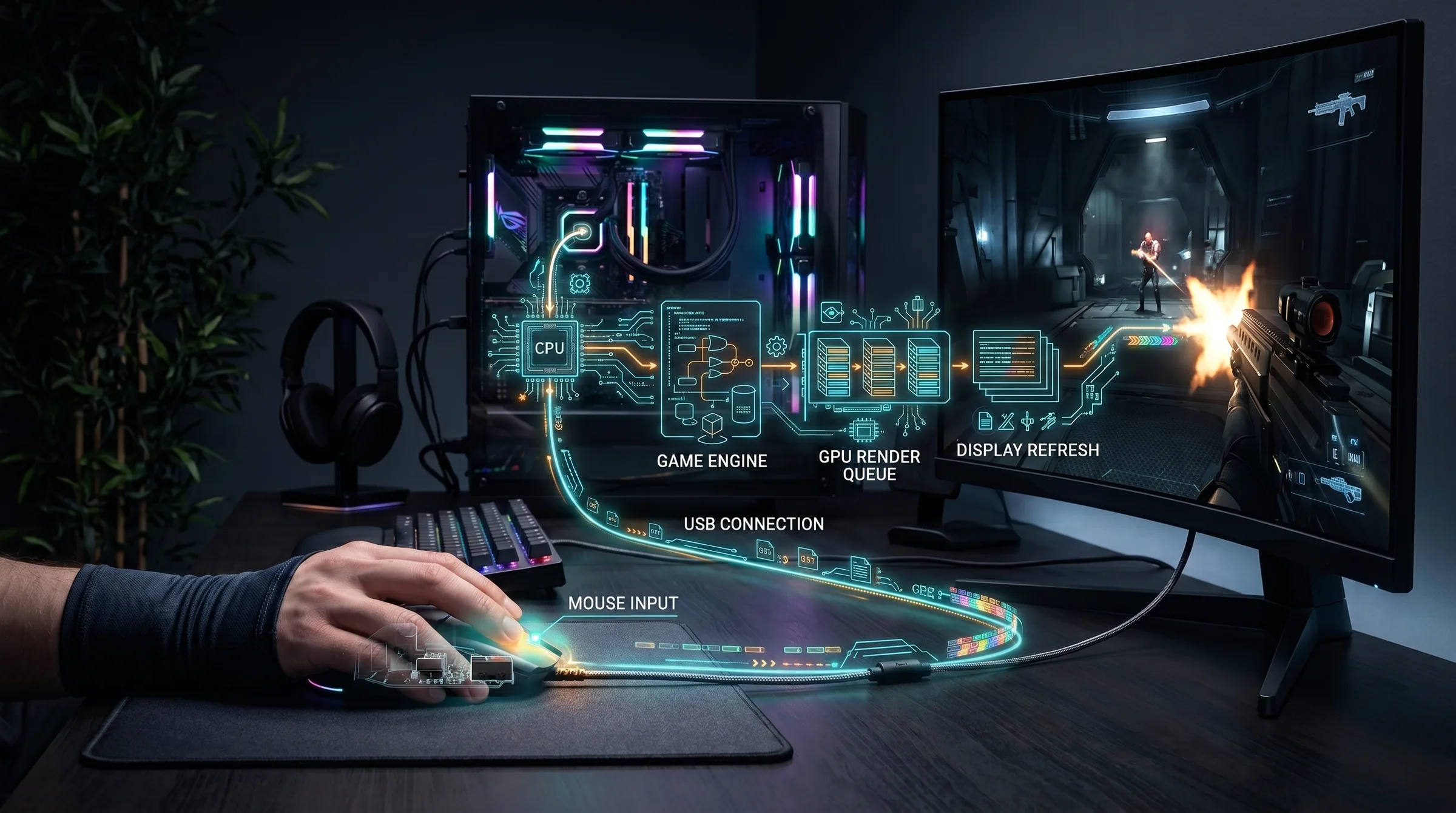
Between your finger moving and the result reaching your eyes, input has to travel through a surprisingly long chain of hardware and software. The mouse detects the click. The operating system and game receive it. The game simulation updates. The CPU prepares work. The GPU renders an image. That image enters a display pipeline. The monitor scans the new frame onto the panel. Only then does light carrying the result reach your eyes.
The entire delay is usually measured in milliseconds.
That sounds trivial until you play a game where a few milliseconds can separate hitting a moving target from firing behind it.
NVIDIA defines end-to-end system latency in essentially this way: the period between player input and the resulting action becoming visible on screen.
The important word is system.
Your monitor is only one part of the delay.
Input lag is a chain, not a single number
People often buy a display advertised as having "1 ms response time" and assume they now have one millisecond of input lag.
That is not what the specification means.
Pixel response time measures how quickly the panel's pixels can transition between states under particular testing conditions. Input latency describes how long it takes for the whole system to reflect an action.
Several delays accumulate.
Your mouse or controller has its own polling behavior. The game processes input at particular points. Frames take time to render. A GPU can develop a queue of frames waiting to be displayed. The monitor receives each completed frame according to its refresh cycle and then scans it onto the screen.
Each stage may be individually fast.
Together they become noticeable.
Frame rate changes the equation immediately
At 60 frames per second, a new frame takes approximately 16.7 milliseconds.
At 120 fps, roughly 8.3 milliseconds.
At 240 fps, roughly 4.2 milliseconds.
This alone explains why high-frame-rate gaming can feel more responsive even when you are not consciously staring at animation smoothness.
Suppose your input arrives immediately after the game began processing its current frame. Depending on the engine and pipeline, it may have to wait before its effect can appear in a future frame.
Shorter frames mean less time spent waiting.
High refresh rates also allow the display to present updated visual information more frequently. The combination is why moving from 60 Hz to 144 Hz can feel dramatic in fast games even to someone who knows nothing about display technology.
Why rendering faster isn't always enough
A PC can produce many frames and still feel less responsive than expected.
One culprit is the render queue.
If the CPU is preparing frames faster than the GPU can complete them, work can accumulate. The advantage is that the GPU stays busy. The disadvantage is that the frame you eventually see may represent input from farther in the past.
Modern low-latency technologies attempt to manage this relationship more carefully. NVIDIA Reflex, for example, reduces PC latency by synchronizing work between the CPU and GPU rather than allowing an unnecessarily deep render queue to develop.
The wider lesson applies regardless of hardware brand: maximum throughput and minimum latency are related goals, but they are not identical.
Can humans actually notice a few milliseconds?
This question often gets reduced to a silly argument where somebody claims "the human eye can only see X," as though the nervous system operates at a fixed frame rate.
Human perception does not work like that.
Whether you notice a latency difference depends on its size, what you are doing, what you are accustomed to and whether the delay affects a continuous control task.
A casual turn-based game can tolerate huge amounts of latency without becoming unpleasant.
A competitive first-person shooter cannot.
You may also notice latency more easily through feel than through deliberate visual observation. A mouse cursor, camera or crosshair that follows movement immediately feels connected to your hand. Add enough delay and that relationship becomes loose or heavy even if you cannot identify exactly why.
Musicians encounter a similar issue with delayed audio monitoring. The delay does not need to be consciously counted before it interferes with the relationship between action and feedback.
Controllers add another layer
Wireless controllers do not automatically mean disastrous latency.
Modern wireless protocols can be very fast.
Nevertheless, the controller itself forms another stage in the pipeline. It scans buttons and analogue sticks, packages input and communicates with the host according to its polling behavior.
Different controllers, connection methods and games therefore produce different results.
For most players, these differences are tiny relative to more obvious problems such as playing at 30 fps on a television with heavy image processing enabled.
Which brings us to TVs.
Your television may secretly be making everything worse
Modern TVs can perform an extraordinary amount of work on an incoming image.
Noise reduction, motion interpolation, upscaling, sharpening, dynamic contrast and other processing can improve movies—or at least attempt to.
The problem is that processing takes time.
This is why televisions commonly include a Game Mode. It bypasses or reduces expensive image processing in favor of lower latency.
If a console feels strangely sluggish on a modern TV, checking Game Mode should be one of the first troubleshooting steps.
Does input lag really affect your aim?
At sufficiently high levels of competitive play, yes.
A lower-latency system gives you newer visual information and lets the result of your input reach the display sooner. You are effectively interacting with a version of the game that is slightly closer to the present.
That does not mean buying a 500 Hz monitor will transform an average player into a professional.
Latency improvements face diminishing returns, and skill matters vastly more.
Going from an awful setup to a good one can be transformative. Going from an excellent setup to a slightly better one is much less dramatic.
A player moving from a 60 Hz television with heavy processing to a high-refresh monitor and high frame rate may immediately notice the difference.
A player comparing two well-configured 240 Hz setups may need measurement equipment.
The goal is not zero latency
Zero latency is impossible.
Input must be detected. Game logic must run. Images must be created. Displays must update. Signals must travel.
The real objective is to avoid unnecessary delay.
Run games at a stable, sufficiently high frame rate. Use your television's game mode. Avoid settings that push the GPU so hard that enormous queues develop. Use appropriate low-latency settings when available. And understand that a monitor's advertised response time tells only part of the story.
Once you see the pipeline as a whole, input lag stops being mysterious.
The computer is not ignoring your click.
It is simply taking a very complicated journey before showing it back to you.